
The Backstory
Dynacat serves as my primary homepage and daily mission control across my desktop and homelab machines. It brings together my work calendar, daily schedule, homelab quick-links, and media feeds into one lightweight, customizable space.
While Dynacat comes with solid baseline modules, I quickly ran into specific metrics and workflows I wanted front and centre without needing to open secondary apps or browser tabs. What started as an experiment to bridge task management into my startpage evolved into writing and maintaining custom widgets. Along the way, I submitted these modules upstream to the official community directory at Panonim/dynawidgets so other self-hosters can drop them into their setups, while maintaining the primary source in my personal repository.
Current Widget Suite
1. Todoist Integration
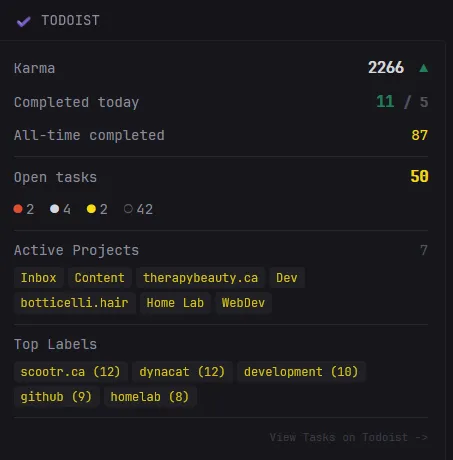
The widget that kicked off the project. Built to pull high-level task metrics directly via the Todoist REST API without requiring me to open the full app during deep work sessions.
- What it does:
- Displays daily and weekly completed task counts alongside Karma productivity metrics.
- Surfaces open task tallies organized by priority and project buckets.
- Provides quick-access links into active filters and priority views.
2. Currency Exchange Rate
A clean, automated financial tracker built using the ExchangeRate-API to monitor Canadian Dollar (CAD) rates against major global currencies.
- What it does:
- Fetches and displays real-time exchange rates (defaulting to CAD against USD and EUR).
- Surfaces a clear "last synced" timestamp to verify data freshness.
- Fully configurable to track any base currency and target pairs supported by the ExchangeRate-API.
3. WakaTime Coding Metrics
A developer-focused widget that hooks into the WakaTime API to monitor daily programming activity and time spent in the editor directly from the dashboard.
- What it does:
- Pulls live daily coding time metrics and streaks.
- Visualizes editor and language breakdowns to keep tabs on current project focus.
- Minimal UI footprint designed to blend into Dynacat's native grid without visual clutter.
Architecture & Design Approach
Building widgets that sit on a permanent browser startpage requires strict design constraints:
- Low Overhead & Smart Polling: API calls are cached and timed to respect upstream rate limits while keeping browser load times instantaneous.
- Upstream Standards: Each widget is packaged according to Dynacat's component guidelines, making them compatible with both manual YAML configs and direct imports from dynawidgets.
- Fault Tolerance: Third-party APIs occasionally hiccup; widgets are built with graceful fallback states so an API timeout never breaks the dashboard grid or throws unstyled layout shifts.
What’s Next
Because Dynacat anchors my daily workflow, this repository remains an active workspace. As new needs pop up in my day-to-day dev environment, homelab monitoring, or entertainment feeds, new widgets will continue to land here and make their way upstream.